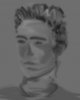
Joims' First attack at photoshop

baron insig

Newbie
Joined
Oct 18, 2004
Messages
2,618
Reaction score
0
Basically Me learning stuff but i want an opinion your likes dislikes and any ways i can next time improve upon it would be great .

:o
 

Attachments

  • jim2 cleaned gamma grey22 cop55y.jpg
    jim2 cleaned gamma grey22 cop55y.jpg
    34.8 KB · Views: 232
Looks good but I would try not to blur it (in some way that how it looks) the next time.
 
smudge tool is not your friend in photoshop...

if you want that kind of effect I suggest using the rake tool in Corel painter instead...

in photoshop I find that your much better of doing multiple low opacity strokes, rather than using the smudge tool...
 
'attack is a suitable word....

lol only messin. i quite like the effect in this particular image!
try creating something using a similar style, but make it more complicated.
or even HL2 related! :)
id love to see a combine firefight in that style!
 
Hehe yeah i attacked photoshop again but tried a different angle but only smudged on the hair whihc i tihnk can look interesting but it isnt as good on this version
 
attack?
thats barely a light skirmish...

i say you go ahead with tactical strike!

i mean.. try drawing something else in that style. it may have more potential, or it might not. u wont know until u try!
 
yeah i shall give it ago :P all out assualt on my mouse and megamat :O
 
You could make a cool sig out of that effect - just don't put your face in it :angel:
jk
 
i decided to deviate from the effect and try and draw accuratly,

this aint finished mind you i just cant think of a easy effective way of doing the hair and rest of face :O

any tips n ideas would be great
 
one sec:
Welcome to My site
It isn't finished yet, and will probably be redesigned. This design is an old one - and hopefully Ill start the new design before the end of the holidays
 
Thats a pretty useful site

Put more pics of what your doing in it tho cos i dont know what half the stuff is i only been using photoshop since boxing day :( (the 26th of december )
 
lol. Yeah, that was last years work. Havent touched it since (look at date in Status Bar) and really need to update it
 
The site doesn't like HTML :p sorry.

But that girls face is a bit too roundish imo, makes her face look "fake", but the eyes, nose, mouth are all very well drawn :)
 
Erm... if you want to do "digi-art" I would've taken graphics :P
 
heh heh, Nah my college does graphic products ( so no real on pc drawing of stuff other than boxes :( n stuff :P

But Art at my college is done with 2 modules in paralel " A Sense of place" and " Portrait " and jsut for a luagh im doing this on pc and if teachers accept it i will probs do more of it next year in a level, this year im doing a series of monoprints as my final study :D

Cremeator her name is Alex :P based on a real person i know, did it for her really :P
 
There is a distort function in Photoshop. You can either use the liquify function (Ctrl+Shift+X) : PS7 - Filter -> Liquify, PS6 - Image -> Liquify (I think)
Or you can skew. To do this, ctrl and drag the edge of the image while the "Show Bounding Box" is checked in the move tool (V). If you ctrl+drag the corners, you skew the image by only the corner. If you ctrl+drag the edges you horizontally or vertically skew the picture. As usual, holding down Shift while skewing will distort the image proportionally (well, regularly seeing as you're disproportioning it anyway).

Hope that helps. Can't be bothered checking it makes sense myself
 
At leat you post something :) As for me, I think you should really try the distort tool (my fav).

btw, nice new avatar, Druckles. Missed ur old greenhouse one :D
 
Wow cool :d Cheers I was wondering where that key part in ps was :P

Thats cool


did i mention thats cool ? :0 woo thx
 
thats The same tool :P jsut diff ways of going to it sorry Cremator Druckles Beat ya to it :D
 
Skew=Distort. You try doing either, they're identical
 
To distort an image? Ha!

And BTW, Joims, there is a Filter->Distort->Wave function which is very useful. It produces random distorts and is only remotely controlled by the user so is good for abstract stuff and backgrounds
 
wow, i love the image of "alex". That looks really good. Like you said, the hair looks a bit wirey though.
 
:D ty suicide42

Druckles i had a crack at your wave, distortion and in like 10 secs i had a shexay layer to a bg.


mmm the hair is a bit buggered i might have a crack at using the gamma and levels to tone out the black, should be interesting due to my lack of skills ;)

EDIT: /Joims realises he merged all hair. next time joims never merge layer till AFTER he finished :(
 
before you merge, it's a good idea to duplicate the layers in case you want to go back later (Ctrl+J for Quick Duplicate)
And that kinda looks like the tutorial I made for a wicker effect...
 
Basically i got a grey background made a nother layer and did a criss cross onto that new layer bit like a football pitch freshly mown but spread further out and the put in on "wave" in distort and craked up the amplitude and that came out :P cant remeber the settings now tho :( ahwell

Thanks for all the help from you lot, been a big learning curve but theres even more to curve yet :P
 
When you do a wave, try and keep the settings really wavy and smooth, so go for more wavelength and less amplitude
 
druckles theres a much easier way of maying a 2px thick circle just use stroke :S ...
as for joims i love ur drawing and painting it looks like its going in a good direction .
add me to ur msn i need to tlak to u [email protected]
 
I know... that's a real old site and will probably be updated sometime in the next few days. Look at the last modified date. And you will find that it depends opn what you're trying to produce. A stroke isn't always best, but it usually is
 
Tell me, was that a sketch originally or a photo?
 
Back
Top