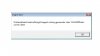
My first impulse would be to clean Garry's mod. Keep in mind that this will erase any custom content you have added so you might want to backup your screenshots, Saved games, etc.
I did something similar. I closed Steam, went to Gmod9 folder and deleted it.. Started Steam and Garys Mod was nolonger in the list.. So good, i closed steam and installed garys mod again.. Started steam and click play for Gmod. And the same thing still happens. I click on a server, it gets to "retrieving Server info" when its almost finished retrieving the game crashes to desktop with that error message.
When playing Garrys Mod "Version 9" This will fix your problem.
1>. Open Steam right click on garrys mod and make a desktop shortcut.
2>. Right click on that short cut and goto Target line and change from the following.
-From: "D:\Program Files\Steam\Steam.exe" -applaunch 220 -game "d:\program files\steam\SteamApps\SourceMods\gmod9"
-To: "D:\Program Files\Steam\Steam.exe" -applaunch 215 -game "d:\program files\steam\SteamApps\SourceMods\gmod9"
(-applaunch 220) To (-applaunch 215)
3>.Save the Target-Line and open it.
4>.Install the Mod it asks you to, "SDK Base"
5>.Use the Gmod/9 shortcut on your desktop from now on.. That should fix your Problem.