light entities dont work

  • Thread starter Thread starter coolkid
  • Start date Start date
C

coolkid

Guest
when i put in a light, or spot light i cant see it,
ive tried moving it outside of the light modle,
inside the light modle
, using a spot light,
changing the brightness to 4000.
deleting my sun
but all i get is a perfectly blended light everywhere in my map, as if its day

what i would like to know, how do i make it dusk, with lights that u can see.

im using a skybox.
 
do you have a light_environment entity?

did you run VRAD?

does your map have a leak?
 
i put in a light enviroment, but that stilll dint work.

plus i dont know what a vrad is.

could you elaberate plz. i really want some shadows in my map.
 
are you trying to see the light inside the editor (like the unreal engine?)

VRAD is the light part of the compile, make sure it's checked before compile
 
press compile. (F9)

Let the machine work. Dont run the game.

When done go to the top of text and start looking for the word ***leaked***

If this is found, close box of "gibberish" text. Go to map - load pointfile.

Select yes. Now you will have a line somewhere in your map. follow this until this line leaves the inside of your map through a hole somewhere. Seal this hole.

repeat all of this until the word ***leaked*** cannot be found in compile.

If the problem persists, post compile log here.
 
ok, i enabled the vis in the compiler and got the sun to work and a normal light

but still the spot lights dont work.
im runing out of ideas.
 
what are your settings for these lights? have they got names?

In my experience all spotlights stop working of you name them....

Stupid, yes, but thats how it is.
 
no, i havent named them yet, plus ill get the log later, its night and i dont have time to run it.

it takes forever with the vis on.
 
coolkid said:
no, i havent named them yet, plus ill get the log later, its night and i dont have time to run it.

it takes forever with the vis on.

if your VIS compile is taking forever that means you need to optimize. see here for more details

http://developer.valvesoftware.com/wiki/Optimization

i am working on quite a large map with plenty of visibility areas but with hint brushes VVIS runs in less than a minute. it's the way to go
 
i doubt its becouse my map is to comlex, its relativly small, with only one large stucture made, that only has the basic walls up, no details yet, plus like 5 main lights so i can see how it looks in-game.
 
i compiled the map with only the bsp on.
this is what i got


** Executing...
** Command: "c:\program files\valve\steam\steamapps\coolkid1717\sourcesdk\bin\vbsp.exe"
** Parameters: -game "c:\program files\valve\steam\steamapps\coolkid1717\half-life 2\hl2" "C:\Program Files\Valve\Steam\SteamApps\coolkid1717\sourcesdk\hl2mp_sample_content\maps\dm_junkyard_castle"

Valve Software - vbsp.exe (Jan 2 2006)
2 threads
materialPath: c:\program files\valve\steam\steamapps\coolkid1717\half-life 2\hl2\materials
Loading C:\Program Files\Valve\Steam\SteamApps\coolkid1717\sourcesdk\hl2mp_sample_content\maps\dm_junkyard_castle.vmf
fixing up env_cubemap materials on brush sides...
ProcessBlock_Thread: 0...1...2...3...4...5...6...7...8...9...10 (0)
ProcessBlock_Thread: 0...1...2...3...4...5...6...7...8...9...10 (1)
Processing areas...done (0)
Building Faces...done (0)
FixTjuncs...
PruneNodes...
WriteBSP...
done (0)
writing C:\Program Files\Valve\Steam\SteamApps\coolkid1717\sourcesdk\hl2mp_sample_content\maps\dm_junkyard_castle.prt...done (0)
Creating default cubemaps for env_cubemap using skybox materials:
skybox/sky_wasteland02*.vmt
Run buildcubemaps in the engine to get the correct cube maps.

No such variable "$hdrbasetexture" for material "skybox/sky_wasteland02rt"
Can't load skybox file skybox/sky_wasteland02 to build the default cubemap!
Finding displacement neighbors...
Finding lightmap sample positions...
Displacement Alpha : 0...1...2...3...4...5...6...7...8...9...10
Building Physics collision data...
done (0) (121335 bytes)
Emitting linux collision data (use -nolinuxdata to disable).
Building Physics collision data...
done (0) (276223 bytes)
Placing detail props : 0...1...2...3...4...5...6...7...8...9...10
Compacting texture/material tables...
Reduced 67 texinfos to 57
Reduced 15 texdatas to 15 (310 bytes to 310)
Writing C:\Program Files\Valve\Steam\SteamApps\coolkid1717\sourcesdk\hl2mp_sample_content\maps\dm_junkyard_castle.bsp
3 seconds elapsed
Memory leak: mempool blocks left in memory: 1

** Executing...
** Command: Copy File
** Parameters: "C:\Program Files\Valve\Steam\SteamApps\coolkid1717\sourcesdk\hl2mp_sample_content\maps\dm_junkyard_castle.bsp" "c:\program files\valve\steam\steamapps\coolkid1717\half-life 2\hl2\maps\dm_junkyard_castle.bsp"


tell me if i need to run the vis as well (i know i need to run it for lights, but dint do it becouse it takes like an hour even though i have 5 lights.)
plus could some one explain what the rad option does.
 
if RAD is the lighting, then what is VIS?

also i noticed that in the compile it says i have to run somthing seperate to build cubemaps. what does it mean by that. would that cause any problems?
 
VIS computes visibility to prevent engine overdraw. if your VIS is taking an hour, you need to optimize your map, stat.

buildcubemaps: if you want shiny surfaces to reflect the environment around them (and not just reflect the sky from every surface) you need to add cubemaps entities. running' buildcubemaps' in the console when you load the map simply generates the images necessary to do that and writes them to the BSP. then restart the map to see the results

honestly, you should check out the SDK docs, which answer all your questions in more detail:

http://developer.valvesoftware.com/wiki/SDK_Docs
 
coolkid said:
i compiled the map with only the bsp on...

you need to run BSP, VIS and RAD to get a fully compiled map. check 'normal' in all three boxes when you get the compiler dialogue (i.e. press F9)
 
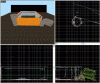
i got a picture of my map, if it is running slow on the compile becouse of complex geometry, then could some on plz help me on what to do?

here is a description to go along with the picture (fyi :my first map EVER)
top left corner: main picture of my map, has two towers, one that is fallen over.
top right corner: the still standing tower, hollowed out with carve, there is a ladder in here and 2 lights at the bottom and 2 at top on the inside. (yes i heard that carve is bad but dont know how else to make a circular tower)
bottom left corner: other part of the base, not much going on here.
bottom right corner: the fallen over tower, lots of geometry here, can i make this into a detail brush, since it isnt a room?

i dont know exactly where or how to place the hint brushes, and what i can turn into detail brushes. (yes i have read the tuturials on the hint brushes, but i dont exactly get them, and i cant find any good maps with them)

would i compleatly sourund my tower with a hint brush?
can i turn the fallen over tower into a detail brush?

any help will be apriciated
 

Attachments

  • HL2_DM_MAP.GIF
    HL2_DM_MAP.GIF
    89.6 KB · Views: 248
In a setup like that (big cube encasing your map) you'll want to make as much as you can be detail mainly because you're getting no real performance gain by having the BSP and VIS work on splitting the geometry and working on the leafs. So, in a sense you could turn everything into func_detail, but it'll render everything as well and might be tough on your graphics card.

Also I'm sure there's a lot of stuff that could be optimized.
 
when i do run the vis it gets expedentialy slower as time passes, by the 2nd row of numbers its barely moving, by 6, it goes up one dot every 10 minutes.

1...2...3...4...5...6...7...8...9...10 (4) (this row took about 2 minutes)
1...2...3...4...5...6.(i give up here)

the bsp and rad work fine and take up only about 2 minutes together. should a map like mine take this long?
 
It's normal for that to happen.

Let it run for a few hours, if it's still going you really need to look into rebuilding your map.
 
cubemaps are placed in hammer but the "pictures" cannot be taken unless ingame.

What this means is that you will have to load up yourr map in the game and type "buildcubemaps" in the console and all will be well.... These cubemaps will then remain there so that you wont have to do this every time.

If you change something in your map however, then you're gonna have to do it all again.
 
First of all you should learn to make curves properly without using carve. You can search the mapping forum for the word "curve" and probably find a bunch of info on that. Also it looks like your ground under your towers got carved when you made your towers. Delete it and replace it with a large six sided brush.

A limitation of the source engine is that it doesn't handle huge wide open spaces like you have there very well. If you can shrink the size of that it would help a bit.

Turning the towers into func_details would also drastically improve your compile times. Personally I don't use hint brushes very often (or at all) but I believe what you would want to do is put one large cube completely surrounding the tower with the hint texture. I don't think that's neccassary if you just func_detail it tho.
Good luck!
 
Back
Top